Overview: What Are AI Conversations?
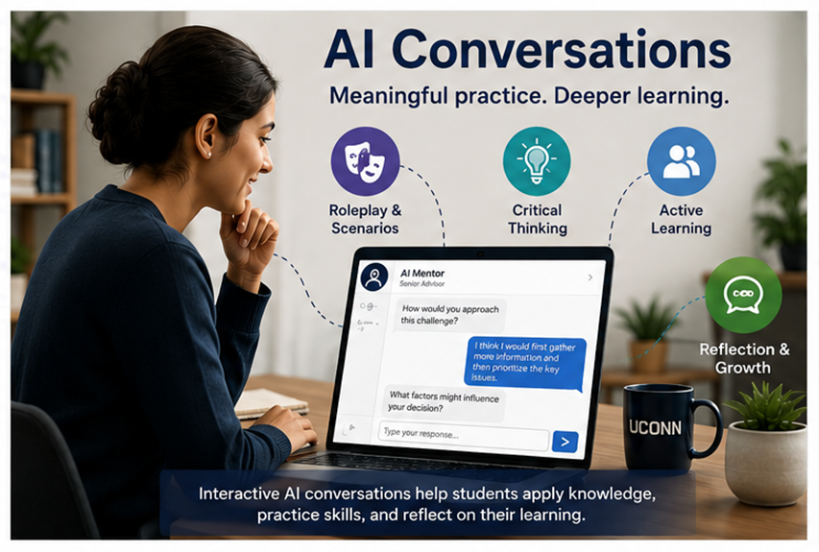
AI Conversations in Blackboard Ultra allow instructors to create interactive chat-based learning activities using structured personas, scenarios, student roles and reflections. These conversations simulate authentic interactions—such as roleplays, case studies, peer mentoring, or Socratic questioning—to strengthen critical thinking and formative practice. This aligns with UConn’s priorities for purposeful GenAI integration, transparency, and human‑in‑the‑loop oversight. Blackboard reinforces this at the start of every AI Conversation with a clear disclosure: ‘My responses are generated by AI and therefore may contain bias or inaccuracies.’ With that reminder in mind, let’s explore what we can do with this tool.
Why Use AI Conversations?
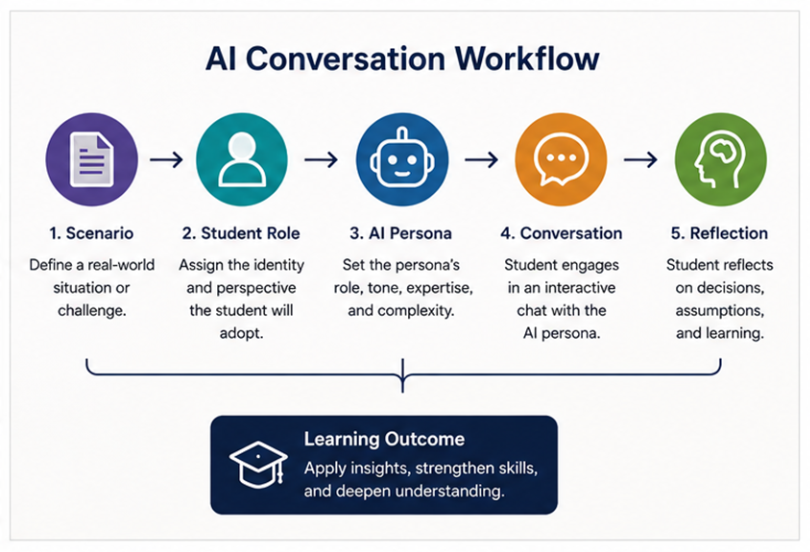
AI Conversations are built from three core elements:
- Student role – the identity they adopt (analyst, mentor, nurse, engineer, etc.)
- AI persona – the tone, expertise level, personality traits, and complexity of the system
- Reflection – prompts students to analyze their decisions, examine assumptions, and articulate what they learned after the AI exchange, turning the conversation into deeper metacognitive growth (Lo, 2023).
These components create meaningful, aligned learning experiences across disciplines.
AI Conversations support high quality online instruction by enabling:
- Formative assessment through interactive practice and feedback
- Authentic scenario-based learning at scale
- Active learning instead of passive content consumption
- Alignment with instructional goals (module outcomes, assessments, activities)
- Structured skill practice for communication, reasoning, interviewing, decision making
Four Step Setup
- Select Conversation Type
- Choose between:
- Role Play – student takes on a defined role
- Socratic Questioning – AI guides deeper reasoning or continuous questioning
- Choose between:
- Student Instructions
- Define the scenario
- Provide a short, real world moment students must respond to (client disagreement, patient symptoms, group project conflict, etc.).
- Define the scenario
- Assign the Student Role
- Clarify who the learner is (teacher candidate, engineer, social worker, etc.).
- Build the AI Persona
- Specify the persona’s:
- Name
- Role/expertise
- Tone
- Complexity of responses
- Specify the persona’s:
- Edit Reflection Questions
- Edit a targeted reflection question(s) that prompts students to evaluate their decisions, examine assumptions made during the conversation, and articulate what they would do differently in a similar real-world scenario.
Instructors can preview the conversation and later review student transcripts in the grading view.
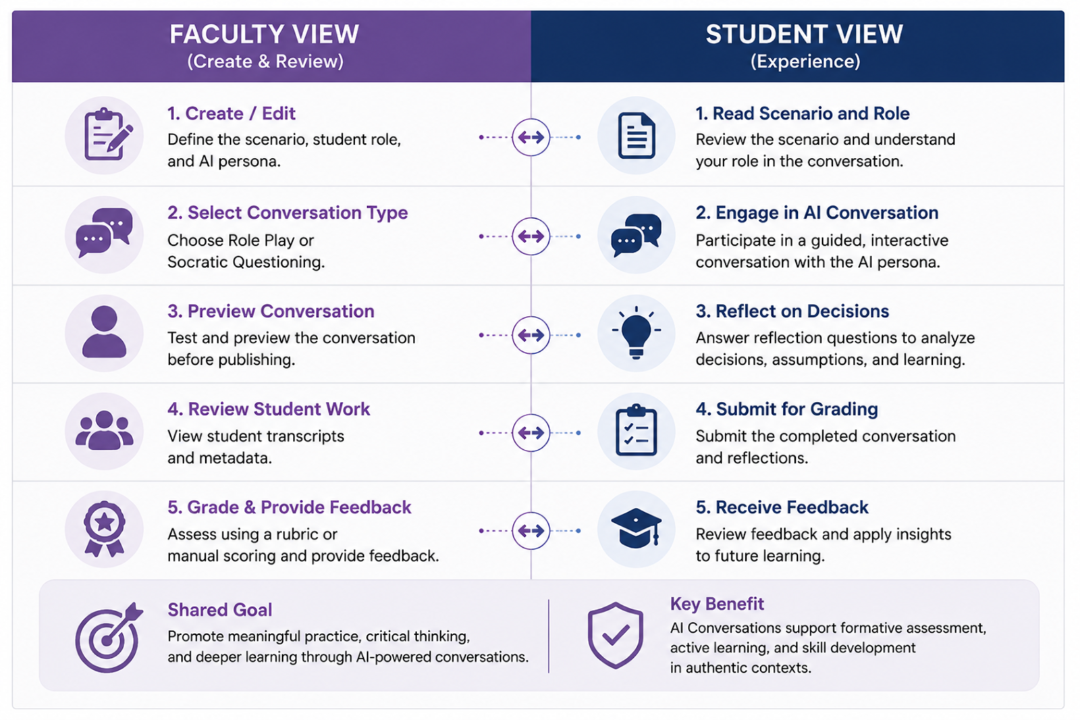
Faculty View vs Student View of AI Conversation
Below is a clear comparison summarizing what each user sees during an AI Conversation activity:
Faculty View
- Create/edit scenario, student role, and persona
- Select conversation type (Role Play or Socratic)
- Preview conversation before publishing
- Access student transcripts
- Grade using rubric or manual scoring
- View conversation metadata (timestamps, attempts)
Student View
- Receives scenario and role description
- Sees persona description (in simplified form, if enabled)
- Engages in live chat-based conversation
- May restart or continue depending on instructor settings
- Submits conversation for grading
This layout helps faculty clearly understand what students will experience when completing AI Conversation assignments.
Examples of AI Conversation Activities
The examples below offer quick, high‑level templates to show what an AI Conversation can look like across different disciplines. You can expand these with more detail in your own course—or use the AI Design Assistant to generate customized scenarios, roles, and personas for your specific needs.
Case Study (Nursing / Health Sciences)
- Student Role: On shift nurse
- AI Persona: ICU supervisor (calm, direct)
- Scenario: Patient with a sudden drop in blood pressure
- Purpose: Evaluate prioritization, clinical reasoning, and communication
Interview / Client Consultation (Social Work / Business / Education)
- Student Role: Social worker, recruiter, advisor, or consultant
- AI Persona: Client with specific concerns or goals
- Scenario: Client presenting a challenge or disagreement
- Purpose: Practice interviewing skills, empathy, needs assessment, or conflict resolution
Study Buddy or Exam Prep Bot (Psychology / General Ed)
- Student Role: Student preparing for a quiz
- AI Persona: Curious, energetic peer reviewing key concepts
- Scenario: Instructor supplies list of topics
- Purpose: Reinforce vocabulary, clarify misconceptions, prompt retrieval practice
Engineering Design Review Bot
- Student Role: Junior engineer
- AI Persona: Senior design reviewer or safety auditor
- Scenario: Student must justify the choice of material or mathematical approach
- Purpose: Practice technical communication and problem-solving rationale
Classroom Scenario Bot (Teacher Education)
- Student Role: Teacher candidate
- AI Persona: Parent, student, or mentor teacher
- Scenario: Student handling a classroom management or assessment question
- Purpose: Prepare for field experiences through realistic dialogue
Using the AI Design Assistant to Help Create Your AI Conversation Prompts
Blackboard’s AI Design Assistant can assist instructors by generating the AI Conversation prompt for them (Blackboard, n.d.):
- Draft scenarios (e.g., case study descriptions, interview setups)
- Role descriptions for students
- Persona outlines including tone, expertise, and behavior
- Suggested prompts aligned to Bloom’s Taxonomy
Instructors can adapt the draft into a polished AI Conversation setup. The Design Assistant significantly reduces the time needed to craft high-quality learning activities (Fang & Broussard, 2024).
Quality Matters (QM) Alignment Statement
AI Conversations supports Quality Matters alignment by linking assessments, learning activities, and instructional materials to measurable learning objectives. When instructors define clear roles, scenarios, and personas, AI Conversations function as aligned formative assessments that support learner mastery.
Additional Resources
Related Resources
Related Articles
References
- Blackboard. (n.d.). AI Design Assistant. Blackboard Help.
- Fang, B., & Broussard, K. (2024, August 7). Augmented course design: Using AI to boost efficiency and expand capacity. EDUCAUSE Review.
- Lo, L. S. (2023). The CLEAR path: A framework for enhancing information literacy through prompt engineering. The Journal of Academic Librarianship, 49(4), 102720.